

3d Printers | Desktop 3d Printer, blog, Buying Guides
Best 3D Printer for Beginners Under $500 [2026 Guide]
Apr
- Best Overall: Bambu Lab A1 Mini — fastest setup, best print quality at $219
- Best Budget: Creality Ender 3 V3 SE — proven platform, huge community, $199
- Best Speed: Anycubic Kobra 3 — 600 mm/s Combo system, $299
- Best for Tinkerers: Elegoo Neptune 4 — open-source Klipper, $259
- Best Plug-and-Play: Flashforge Adventurer 5M — CoreXY speed with one-click leveling, $279
Getting into 3D printing in 2026 has never been easier — or more affordable. A handful of printers under $500 can now produce results that would have cost thousands just a few years ago. But with dozens of options flooding the market, knowing which one to actually buy is the hard part.
In this guide we tested and compared the five best beginner 3D printers under $500. We cover real specs, honest pros and cons, and exactly who each machine is best for — so you walk away with a clear answer, not more confusion.
Quick Comparison: Best Beginner 3D Printers Under $500
| Printer | Price | Build Volume | Max Speed | Auto-Level | Best For |
|---|---|---|---|---|---|
| Bambu Lab A1 Mini | $219 | 180×180×180mm | 500 mm/s | Full auto | Beginners wanting zero fuss |
| Creality Ender 3 V3 SE | $199 | 220×220×250mm | 250 mm/s | CR Touch | Budget buyers, large community |
| Anycubic Kobra 3 | $299 | 255×255×260mm | 600 mm/s | LeviQ 3.0 | Speed freaks, multi-color prints |
| Elegoo Neptune 4 | $259 | 225×225×265mm | 500 mm/s | 121-point | Tinkerers, Klipper fans |
| Flashforge Adventurer 5M | $279 | 220×220×220mm | 600 mm/s | One-click | Plug-and-play users |
1. Bambu Lab A1 Mini — Best Overall Beginner 3D Printer
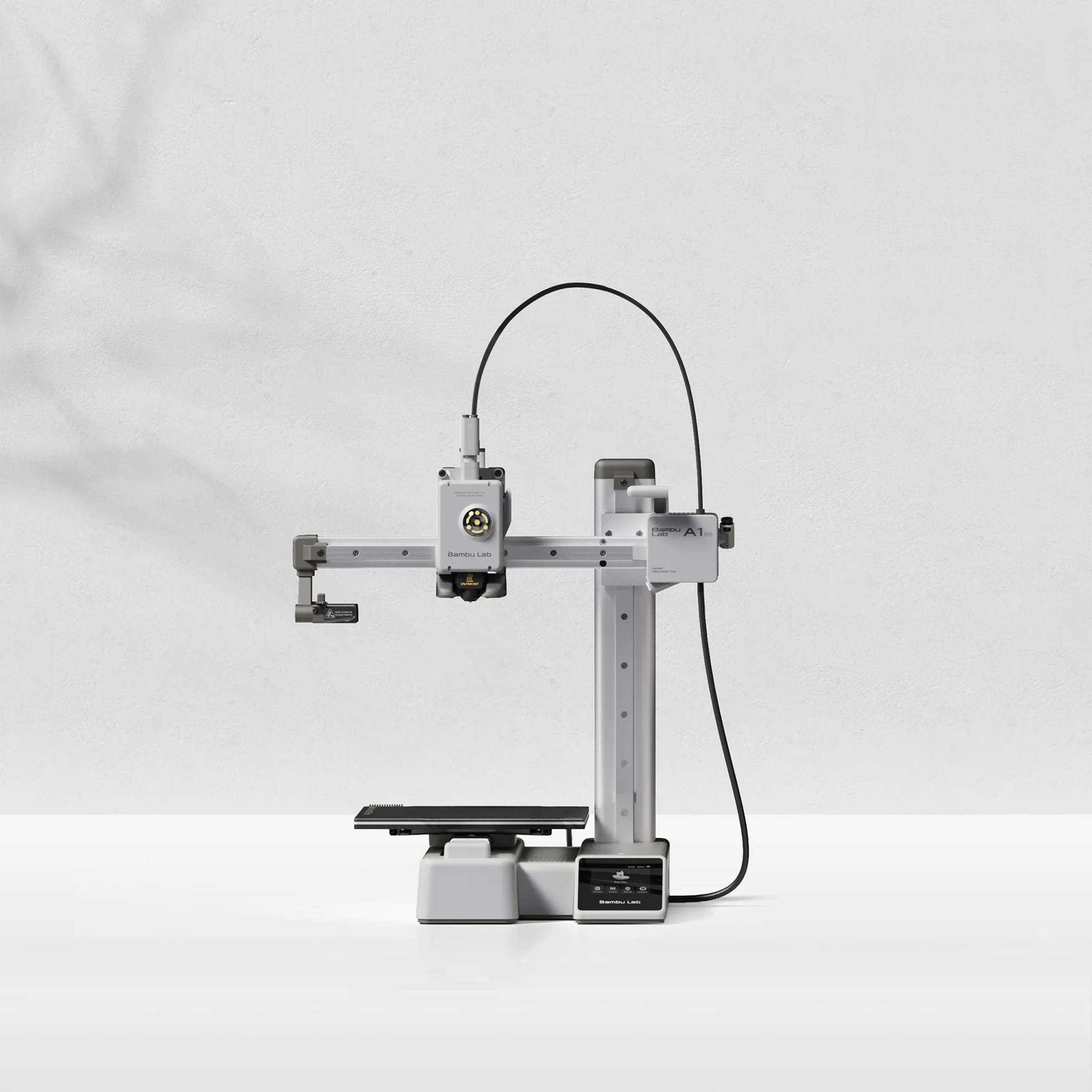
The Bambu Lab A1 Mini has become the gold standard for beginner 3D printers — and for good reason. At $219 it delivers a printing experience that rivals machines costing two to three times as much. Setup takes under 15 minutes out of the box. Just unbox it, run the automatic calibration sequence, and send your first print from the Bambu Handy phone app.
Specs
- Build Volume: 180 × 180 × 180 mm
- Max Print Speed: 500 mm/s
- Layer Resolution: 0.05–0.35 mm
- Filament Types: PLA, PETG, TPU, PLA+ (with AMS Lite: multi-color)
- Auto-Leveling: Full automatic (no manual adjustment needed)
- Connectivity: Wi-Fi, Bambu Cloud, LAN mode
- Bed: Flexible PEI magnetic spring steel
Pros
- Fastest beginner setup — under 15 minutes
- Consistently excellent print quality out of the box
- Bambu Studio slicer is beginner-friendly with expert depth
- Optional AMS Lite adds 4-color printing
- Active app ecosystem with remote monitoring
Cons
- Smaller 180mm build volume vs competitors
- Proprietary ecosystem (accessories cost more)
- Less DIY-friendly than open-source alternatives
2. Creality Ender 3 V3 SE — Best Budget Beginner Printer

The Creality Ender 3 V3 SE is the most popular beginner 3D printer in the world for good reason — at $199 it delivers reliable prints with a massive community behind it. If something goes wrong, there are thousands of forum posts, YouTube guides, and fellow Ender owners to help you through it. The V3 SE introduced automatic leveling via the CR Touch probe, eliminating the most frustrating part of earlier Ender models.
Specs
- Build Volume: 220 × 220 × 250 mm
- Max Print Speed: 250 mm/s
- Layer Resolution: 0.1–0.35 mm
- Filament Types: PLA, PETG, TPU
- Auto-Leveling: CR Touch automatic probe
- Connectivity: USB, SD Card (no Wi-Fi)
- Bed: Removable PEI-coated spring steel
Pros
- Largest community support of any beginner printer
- Biggest build volume in this price range
- Huge library of upgrade mods available
- Excellent print quality at this price point
- Creality Print slicer is easy to learn
Cons
- No Wi-Fi — USB or SD card only
- Slower than newer competitors
- Still requires some assembly vs full plug-and-play options
3. Anycubic Kobra 3 — Best Speed for Beginners

The Anycubic Kobra 3 at $299 brings professional-grade speed to beginner pricing. Its 600 mm/s top speed (with a 20,000 mm/s² acceleration) means prints that would take 4 hours on older machines finish in under 90 minutes. The Kobra 3 Combo version adds a 4-color ACE Pro multi-color system, making it exceptional value if you want to explore multi-material printing without spending $500+.
Specs
- Build Volume: 255 × 255 × 260 mm
- Max Print Speed: 600 mm/s (20,000 mm/s² acceleration)
- Layer Resolution: 0.05–0.35 mm
- Filament Types: PLA, PETG, ABS, ASA, TPU
- Auto-Leveling: LeviQ 3.0 (49-point)
- Connectivity: Wi-Fi, Anycubic app
- Bed: Double-sided textured PEI
Pros
- 600 mm/s print speed dramatically cuts print times
- Large 255mm build plate
- LeviQ 3.0 leveling is highly accurate
- Multi-color Combo system available at ~$299
- Handles ABS and ASA (not just PLA)
Cons
- Max speed requires proper slicer tuning
- Higher noise at top speeds
- App can be inconsistent
4. Elegoo Neptune 4 — Best for Tinkerers

The Elegoo Neptune 4 runs Klipper firmware — the open-source powerhouse favored by experienced makers — right out of the box. For $259 you get direct access to input shaping, pressure advance, and a fully customizable config file. If you love tweaking settings and optimizing performance, this is your machine. The Neptune 4’s 121-point auto-leveling mesh ensures near-perfect first layers even on a slightly warped bed.
Specs
- Build Volume: 225 × 225 × 265 mm
- Max Print Speed: 500 mm/s
- Layer Resolution: 0.05–0.35 mm
- Filament Types: PLA, PETG, ABS, TPU, Silk PLA
- Auto-Leveling: 121-point CR Touch mesh
- Connectivity: Wi-Fi, Klipper web interface (Fluidd)
- Bed: Magnetic flexible PEI spring steel
Pros
- Klipper firmware = maximum tunability
- 121-point bed leveling mesh for perfect first layers
- Direct drive extruder handles flexible filaments well
- Full web interface via Fluidd for remote control
- Strong community of Klipper users
Cons
- Klipper has a steeper learning curve than Marlin
- Requires more initial configuration than plug-and-play options
- No multi-color support without major modification
5. Flashforge Adventurer 5M — Best Plug-and-Play Option

The Flashforge Adventurer 5M combines a CoreXY motion system with one-click automatic leveling and fully-enclosed design — all for $279. CoreXY means the print head moves in X and Y while the bed only moves in Z, resulting in higher speeds and better print quality on tall objects. The fully enclosed frame makes it significantly better at printing ABS and ASA without warping. If you want to skip learning and just print, this is your machine.
Specs
- Build Volume: 220 × 220 × 220 mm
- Max Print Speed: 600 mm/s
- Layer Resolution: 0.05–0.35 mm
- Filament Types: PLA, PETG, ABS, ASA, TPU, PA
- Auto-Leveling: One-click automatic (strain gauge)
- Connectivity: Wi-Fi, Ethernet, USB, Flashforge Cloud
- Motion System: CoreXY
Pros
- CoreXY delivers superior speed and print quality on tall models
- Easiest setup in this comparison — truly plug-and-play
- Handles engineering filaments (ABS, ASA, PA) reliably
- Ethernet connectivity option is great for workshop environments
- Very quiet operation
Cons
- Smaller Z-height (220mm) than some competitors
- Flashforge ecosystem is more closed than open-source options
- Flashprint slicer is less powerful than Bambu Studio or Orca
FDM vs Resin: Which Type Is Right for You?
All five printers above use FDM (Fused Deposition Modeling) — the most common type for beginners. But you may have seen resin (SLA/MSLA) printers like the Elegoo Mars series. Here’s the key difference:
| Feature | FDM (Filament) | Resin (SLA/MSLA) |
|---|---|---|
| Detail Level | Good (0.1–0.3mm layers) | Excellent (0.02–0.05mm layers) |
| Print Size | Large (200–300mm+) | Smaller (130–200mm typical) |
| Post-Processing | Minimal | Requires washing + curing |
| Materials | PLA, PETG, ABS, TPU, etc. | Photopolymer resin |
| Best For | Functional parts, large prints | Miniatures, jewelry, dental |
For most beginners, FDM is the right starting point. It’s more versatile, easier to post-process, and the filaments are non-toxic and easy to store. Save resin printing for when you need extreme detail.
What to Look for in a Beginner 3D Printer
Build Volume
Build volume is the maximum size of object you can print. Most beginners don’t need more than 200mm on each axis, but going slightly larger (like the Ender 3’s 220mm bed) gives you more flexibility. Just remember: bigger isn’t always better — a larger bed takes longer to heat and can be harder to calibrate.
Filament Compatibility
Start with PLA — it’s the easiest filament to print, doesn’t warp, and is available in hundreds of colors. Once you’re comfortable, PETG adds moisture resistance for functional parts. If you want to print flexible objects, look for a direct drive extruder (like the Neptune 4) rather than a Bowden setup. Check out our full 3D printers collection for filament bundles.
Auto-Leveling
Every printer in this guide includes automatic bed leveling — a must-have feature that was optional just two years ago. Good first layers are 80% of print success. The best systems (like the Neptune 4’s 121-point mesh) compensate for even a slightly warped bed.
Print Speed vs Quality
Faster is not always better. A printer rated at 600 mm/s may actually produce better results at 200–300 mm/s for detailed prints. Speed ratings are maximums — real-world quality printing happens at 40–60% of maximum speed for most machines. That said, faster machines give you the flexibility to speed up when you need a quick prototype.
Enclosed vs Open Frame
Open-frame printers (Ender 3, Bambu A1 Mini, Neptune 4) are fine for PLA and PETG. For ABS, ASA, or nylon — which need a stable temperature environment — an enclosed printer like the Flashforge Adventurer 5M is significantly more reliable. If you think you’ll eventually want to print engineering materials, factor this into your decision.
Slicer Software
Every 3D model needs to be “sliced” into layers before printing. Bambu Studio (for Bambu printers) and OrcaSlicer (compatible with most printers) are the two best slicers for beginners. They’re free, regularly updated, and include beginner-friendly profiles. OrcaSlicer works great with the Neptune 4 and Ender 3. For inspiration on what to make, pair your printer with a digital microscope for detailed quality checks.
Cost of Ownership: What Does 3D Printing Actually Cost?
| Item | Cost | Notes |
|---|---|---|
| PLA Filament (1kg spool) | $18–$28 | Lasts 6–12 months for casual users |
| Replacement Nozzles | $5–$15 each | Replace every 3–6 months with regular use |
| Build Plate (PEI Sheet) | $15–$25 | Replace every 12–18 months |
| Electricity | $0.05–$0.15/hour | Most printers draw 100–250W |
| Typical Cost Per Gram Printed | $0.02–$0.05 | Including filament + electricity |
A typical 3D print costs $0.50–$3.00 in materials. Even accounting for printer cost, most serious makers recoup the investment within a year by printing parts, gifts, and household items they’d otherwise buy. Looking for more ways to get value from your tech? Check out our guide to the best standing desk under $200 for a complete workspace setup.
Watch: 2026’s Best Beginner 3D Printers Compared
Best For: Quick Decision Guide
Best 3D Printer for Kids and Families
Bambu Lab A1 Mini — The automatic everything setup means kids can start printing within 20 minutes of opening the box. It’s also quieter than most competitors, and the magnetic PEI bed makes removing prints safe and easy. Pair it with Bambu’s free model library (Makerworld) for thousands of kid-friendly designs. Also consider pairing it with a drone flight simulator for a complete STEM hobby setup.
Best 3D Printer for School Projects
Creality Ender 3 V3 SE — The 220mm bed handles larger school project models, and the massive Ender community means help is always one Google search away. The price leaves room in the budget for a good filament collection.
Best 3D Printer for Prototyping and Engineering Parts
Flashforge Adventurer 5M — The enclosed frame and support for ABS and ASA make it the best choice for printing functional engineering parts. CoreXY precision means dimensional accuracy on technical models. If you need to inspect your prints closely, our USB digital microscope guide can help you choose an inspection tool.
Best 3D Printer for Miniatures and Tabletop Gaming
For miniature-scale detail, consider stepping up to a resin printer — but if you want to stay FDM, the Elegoo Neptune 4 with a 0.2mm nozzle produces surprisingly good results at 0.05mm layer heights. Pair it with a smart home security camera to remotely monitor long overnight print jobs.
Where to Buy and What to Watch Out For
Browse our 3D printer shop or check out our best budget 3D printers page for curated deals. When shopping, watch out for:
- Fake speed claims — “600 mm/s” printers often print at 150–200 mm/s for actual quality output
- Missing auto-leveling — avoid any printer without ABL in 2026, full stop
- No community support — obscure brands may have great specs but no forum help when things go wrong
- Old firmware versions — check if the manufacturer actively releases updates
Also useful: read reviews from actual makers on Reddit (r/3Dprinting) rather than relying solely on manufacturer claims. Want to stay secure while browsing reviews? See our guide on home security cameras for smart shopping habits.
Frequently Asked Questions
What is the best 3D printer for an absolute beginner?
The Bambu Lab A1 Mini is the best all-around choice for absolute beginners in 2026. It auto-calibrates, connects via Wi-Fi to the Bambu Handy app, and produces excellent print quality with zero manual tuning. Setup takes under 15 minutes.
Can I print useful things or just toys?
Absolutely. Modern FDM printers handle cable management clips, phone stands, tool holders, replacement parts for appliances, custom keyboard keycaps, plant labels, drawer organizers, and hundreds of other everyday objects. The limiting factor is your imagination, not the machine.
How long do 3D prints take?
Small objects (50–100mm) print in 30–90 minutes. Medium models (200mm) can take 4–8 hours. Printers like the Kobra 3 and Adventurer 5M cut those times significantly at higher speeds. Most users print overnight for larger objects.
Do I need design software to use a 3D printer?
No. Thousands of free, printable designs are available on Printables.com, Thingiverse, and Makerworld. You only need design software (like Fusion 360 or Tinkercad) if you want to create your own custom models. For beginners, start with pre-made designs.
Is 3D printing expensive to maintain?
No. The main ongoing costs are filament ($20–$25 per kg) and occasional nozzle replacements ($5–$15 each every few months). Most users spend $30–$60 per year on consumables once past the initial setup. A budget dash cam costs more per year in parking enforcement notices than 3D printing costs in materials.
What filament should I start with?
PLA is the universally recommended starting filament. It prints at low temperatures (190–220°C), doesn’t require an enclosure, rarely warps, and comes in hundreds of colors. Once comfortable with PLA, try PETG for moisture-resistant parts. Avoid ABS until you’re experienced — it requires an enclosure and warps easily.
Can I print with multiple colors?
Yes — the Bambu Lab A1 Mini supports the AMS Lite system for 4-color printing, and the Anycubic Kobra 3 Combo supports multi-color via the ACE Pro system. Single-color printers can still produce multi-color prints using manual filament swaps at layer height. For single-color with color accents, try cool gadget accessories to add finishing touches.
The Bottom Line
The best beginner 3D printer under $500 in 2026 is the one that gets you printing quickly without overwhelming you with configuration. For most people, that’s the Bambu Lab A1 Mini at $219 — it delivers the fastest setup, most reliable results, and best beginner experience in this price range.
If budget is the primary concern, the Creality Ender 3 V3 SE at $199 offers the largest community support and a proven track record across millions of users. For speed, the Anycubic Kobra 3 at $299 is hard to beat. And if you love tweaking and customizing, the Elegoo Neptune 4’s Klipper firmware gives you maximum control from day one.
Whatever you choose, you’re stepping into a hobby that rewards patience, curiosity, and creativity. Start with PLA, download some pre-made designs, and enjoy that first successful print.
Ready to Start Printing?
Browse our curated selection of beginner-friendly 3D printers and accessories.
Related Guides
- Best Standing Desk Under $200 for Remote Workers [2026]
- Best Wireless Home Security Cameras Under $100 [2026]
- Best Outdoor Security Cameras Under $100 [2026]
- Best Budget Dash Cam Under $50 [2026]
- Robot Mower vs Riding Mower: Cost Comparison [2026]
- Fly a Drone From Your Couch: Free Browser Flight Simulator
- Cool Gadgets & Tech Accessories
- Digital USB Microscopes — Buyer’s Guide