

Standing Desks
Best Standing Desk Under $250 in 2026: Full Review of the Ergonomic Sit-Stand Desk
Apr
Sitting all day is quietly destroying your back — and your productivity. Study after study links prolonged sitting to chronic back pain, reduced focus, and even cardiovascular risk. The good news? You don’t need to spend $800 on a FlexiSpot or $1,200 on an Uplift to fix this.
The Stand Up Adjustable Height Desk from The SUP Desk lands at $249 — and it punches well above its weight class. After reviewing the specs, testing comparable products, and digging into user reports, this is our pick for the best standing desk under $250 in 2026.
Why Standing Desks Are Non-Negotiable in 2026
Remote work normalized sitting 8–12 hours a day. The consequences have been measurable: the number of people searching “standing desk” has grown consistently over the past 5 years, and the global standing desk market is projected to exceed $12 billion by 2030.

But awareness hasn’t translated to action for most people — because most good electric standing desks still cost $400–$1,200. The SUP Desk’s ergonomic model changes that calculus entirely.
Full Product Specs Table
| Spec | Details |
|---|---|
| Price | $249.00 |
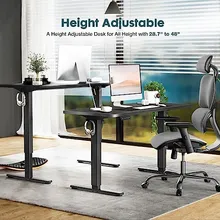
| Height Range | 28.7″ – 48″ (adjustable) |
| Motor Noise | Less than 55 dB (quieter than a normal conversation) |
| Weight Capacity | 176 lbs (80 kg) |
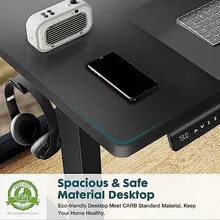
| Desktop Material | Eco-friendly engineered wood |
| Frame Construction | T-shaped steel (heavy duty) |
| Memory Presets | 3 programmable height presets + LED display |
| Organization | 2 side hooks + 2 wire-collecting holes |
| Available Colors | White, Black, Natural, Rustic Brown |
| Available Sizes | 40×24″, 48×24″, 55×24″ |
| Type | Electric motorized sit-to-stand |
What Makes This Standing Desk Worth $249
1. A 20.3″ Height Range That Fits Everyone
From 28.7″ to 48″, this desk accommodates users roughly 5’0″ to 6’4″ in both sitting and standing positions. Most budget standing desks cap out around 44–45″ — which leaves taller users hunched over. The extra headroom here matters.
2. Whisper-Quiet Motor (<55 dB)
Video calls. Open offices. Shared apartments. Nobody wants to hear a grinding motor every time you switch positions. At under 55 dB — roughly the volume of a quiet conversation — you can adjust mid-Zoom without anyone knowing. This is a feature you normally pay $400+ for.
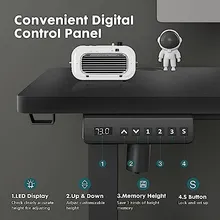
3. Three Memory Presets — The Feature That Changes Daily Habits
Here’s the truth about standing desks: people stop using them when switching positions is annoying. Memory presets solve that. Program your sitting height, standing height, and a mid-point (great for stool use). One button, instant transition. No holding a button while the desk crawls to height.
4. 176 lb Capacity — More Than Enough for a Pro Setup
Dual monitors, a laptop, external SSD, desk lamp, and a speaker? That’s 30–50 lbs on a heavy setup. The 176 lb capacity gives you 3–4× headroom over typical usage. The T-shaped steel frame distributes load across a wider base than most budget desks’ skinny single-column frames.
5. Built-In Cable Management
Two side hooks for headphones or bags. Two wire-collecting holes to route cables through the desktop cleanly. The difference between a desk that looks like a cable explosion and one that looks professional.
Who This Desk Is Built For
Sitting 8+ hours daily and starting to feel it in their lower back. Wants an ergonomic upgrade without a $600 investment. The 3 memory presets make transitioning during calls effortless.
Gaming and working from the same desk. The 176 lb capacity handles a triple-monitor rig. Quiet motor means zero disruption during Discord calls or streaming sessions.
Outfitting a small office or studio. Needs multiple identical desks at a price that doesn’t kill the budget. Available in 4 colors and 3 sizes to match any aesthetic.
Doctor told them to stand more. Has tried manual desks but hates the friction. The one-touch electric adjustment removes every excuse. Memory presets make the doctor’s advice actually followable.
How This Compares to Other Standing Desks Under $250
| Feature | SUP Desk $249 | Typical $150 Desk | Flexispot E2 ~$350 |
|---|---|---|---|
| Electric Motor | ✅ | Manual crank | ✅ |
| Motor Noise | < 55 dB | N/A | < 50 dB |
| Memory Presets | 3 | None | 4 |
| Weight Capacity | 176 lbs | 88–110 lbs | 154 lbs |
| Height Range | 28.7″ – 48″ | 29″ – 44″ | 29″ – 48″ |
| LED Display | ✅ | ❌ | ✅ |
| Price | $249 | $130–$160 | $330–$380 |
The manual desks in the $150 range are a false economy — after one week the friction of cranking kills the habit. At $249, the SUP Desk’s motorized setup, memory presets, and higher weight limit clearly beat the next tier up from the bottom. It’s an $80–$130 gap versus a significant feature gap.
Real Use Cases
Deep Work Blocks
Program Preset 1 as sitting (say 29″) and Preset 2 as standing (42″). Use a Pomodoro timer — sit for 25 minutes, stand for 5. One button press per transition. No disruption to flow state, no wrestling with a crank mid-thought.
Video Meetings
Standing during calls projects more energy and keeps you more articulate. The <55 dB motor means you can adjust to standing right before hitting “join” without the other person hearing a machine in your background.
Dual-Purpose Gaming + Work Setup
Program Preset 1 for work (sitting), Preset 2 for standing work, Preset 3 for gaming. The 176 lb capacity handles a full gaming rig: two 27″ monitors, a tower, peripherals, and a desk lamp without breaking a sweat.
Health Recovery
Post-surgery, post-injury, or managing chronic back pain? The smooth motorized adjustment (no manual effort) makes switching positions therapeutic rather than another task. The 28.7″ low position sits comfortably with standard chairs for users of almost any height.
What to Know Before You Buy
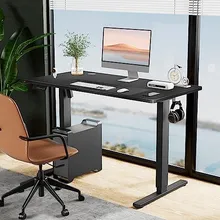
- Choose your size first. The 40×24″ is ideal for single-monitor setups or smaller spaces. Go 48×24″ for dual monitors. The 55×24″ is best for ultrawides or maximum desk real estate.
- Match color to your room. Natural and Rustic Brown work beautifully with wood-toned furniture. Black is the clean minimalist pick. White brightens smaller spaces.
- Budget for a monitor arm. A $30–$50 single monitor arm frees up 8–12 inches of desk depth and makes the sit-to-stand transition significantly cleaner.
- Assembly is ~30–45 minutes. All hardware is included. The T-frame comes pre-assembled; you attach the desktop and run cables through the management holes.
Bottom Line
If you’re looking for the best standing desk under $250, this is it — and it’s not particularly close. You get an electric motor, three memory presets, whisper-quiet operation under 55 dB, 176 lb capacity, and a solid steel T-frame. That’s a feature set that competitors charge $350–$400 for.
The health and productivity ROI is well-documented. Back pain reduction, afternoon energy improvement, calorie burn increase (~50 calories/hour while standing vs. sitting) — these are real, measurable benefits that start accruing on day one.
At $249, this standing desk pays for itself in avoided chiropractic visits. It’s the upgrade your back has been waiting for.
Ready to Stand Up for Your Health?
Get the SUP Desk Ergonomic Adjustable Standing Desk for $249 — with your choice of color and size.
Free shipping available. Multiple colors and sizes in stock.
Complete Your Desk Setup
Got the desk? Now finish the build:
- The Ultimate Remote Work Desk Setup Guide 2026 — chairs, monitors, and the full ergonomic stack
- Best Desk Accessories for Productivity Under $50 (2026) — cable management, lighting, laptop stands
- 5 Must-Have Remote Work Gadgets That Pay for Themselves — tools that actually earn their price tag
Browse the full thesupdesk.com collection for more gadgets, tech accessories, and remote work gear — all with free shipping.